Your free screen
Report for this property
The £39 report takes the figures you just entered and builds the full lender-ready model, sensitivity, break-even and offer-price guide for this property, plus the editable workbook.
One-off downloadable workbook
Holiday Let Deal Report + Spreadsheet — £39
Model a serious UK holiday-let deal before you offer. Use the workbook to assess purchase costs, setup budget, income assumptions, finance impact, break-even occupancy, management route and scenario risk before committing more money.
Secure checkout
Downloadable workbook and access instructions after purchase
Educational tool only
Designed for UK holiday-let investors
Use before committing money to surveys, legal work or offers
Holiday Let Investor provides educational tools and decision-support resources. It does not provide regulated investment, mortgage, tax, legal, planning, valuation or accounting advice. Outputs depend on user assumptions and should support, not replace, your own checks and professional advice.
What you get immediately
A practical decision record for one serious holiday-let deal.
Use this before making an offer, booking a second viewing, paying for a survey, instructing a solicitor, relying on an agent forecast or comparing two properties.
Deal model
Bring the main purchase price, income, cost and finance assumptions into one place before deciding whether the property deserves further spend.
Income assumptions
Test nightly rate, occupancy and seasonality instead of relying only on headline gross income.
Running costs
Allow for cleaning, utilities, insurance, maintenance, platform fees and management costs before estimating profit.
Setup budget
Budget for furniture, linen, photography, safety items, launch costs and contingency before spend creeps beyond plan.
Hot tub and add-ons
Check whether extras such as a hot tub or upgraded furnishing are likely to justify the extra setup and running costs.
Break-even occupancy
See how many booked nights are needed before the property covers its main operating and finance costs.
Cashflow
Estimate whether the deal still leaves usable cash after running costs, mortgage payments and management assumptions.
Sensitivity checks
Check what happens if occupancy drops, nightly rates are weaker, setup costs overrun or management fees are higher than expected.
Decision record
Keep a written record of the assumptions, risks and checks behind your offer decision.
Forecast-to-Pro bridge
Use the original model later as a benchmark for actual performance inside Deal Finder Pro.
Value framing
£39 is small compared with the costs a weak deal can trigger.
The workbook is a low-cost checkpoint before survey fees, legal fees, furniture spend, mortgage commitment or buying a property that only works on optimistic assumptions.
For first-time holiday-let investors
For buy-to-let owners considering short-term lets
For investors comparing two or more properties
For owners deciding whether furnishing, hot tub investment or self-management is worth deeper work
For buyers who want a practical decision record before committing costs
Deal summary
Keep the purchase price, revenue, costs, finance, risk flags and next checks in one place.
Setup budget
Model furniture, launch stock, safety items, add-ons, contingency and replacement reserve before spending.
Sensitivity checks
See whether the deal still works if occupancy drops, setup costs rise or management fees are higher than expected.
Break-even occupancy
Understand the occupancy or revenue line the property must clear before it covers costs.
Forecast vs actual bridge
The same baseline can later be reviewed in Pro against real income, costs and KPI movement.
Worked example
Gross income can hide a marginal deal.
Example: a £325,000 cottage with £38,000 projected gross income may look attractive. After cleaning, utilities, insurance, platform fees, management, maintenance, mortgage costs and setup spend, the break-even occupancy can move sharply.
Compare agent forecasts against your own assumptions.
Model the first year before furniture, hot tub or launch spend.
Keep a decision record before you offer, survey or instruct solicitors.
Why the £39 workbook exists
For one deal that has moved beyond a quick calculator.
The Holiday Let Deal Report + Spreadsheet is for the point where a property is interesting enough to model properly before you make an offer, book surveys or spend legal money.
Who this is for
Buyers with one serious listing, brochure or agent income estimate that needs a saved holiday let cash flow and ROI model.
Founder lens
Built from accounting, commercial finance, interior-design and property-operating experience so furnishing, guest appeal and finance sit in the same model.
What problem it solves
It turns scattered assumptions into one workbook: purchase costs, finance, setup budget, management costs, break-even occupancy and evidence gaps.
Why basic calculators are not enough
A basic calculator rarely keeps the assumption trail, sensitivity checks, target-offer logic, furnishing spend and next-action list together.
Mistake it helps avoid
Relying on headline income or agent estimates before modelling setup cash, platform fees, cleaning, finance, restrictions and management route.
Example use case
A buyer finds a coastal cottage, runs the free screen, then uses the workbook to decide whether to offer, renegotiate or collect better evidence.
Decision it helps with
Whether the property deserves an offer, a renegotiation, more evidence, professional checks or a polite walk-away.
The problem with most holiday-let calculators
A holiday let is not just a nightly rate.
A simple holiday let ROI calculator or Airbnb investment calculator can be useful for a first screen, but viability depends on the interaction between finance, occupancy, seasonality, management fees, furnishing, compliance, repairs, tax changes and operational workload.
Headline income can mislead
A nightly rate is not a profit forecast. Revenue can fall apart after occupancy, platform fees, cleaning, utilities, repairs and finance costs.
Management route matters
A property may only look attractive if self-managed, but self-management has a time cost and can become a second job.
Furnishing costs arrive early
Guest-ready interiors, photography, launch stock, safety items and replacement reserves need modelling before they surprise you.
After purchase still matters
The investment case should be compared with actual bookings, costs, occupancy, KPI movement and monthly P&L after launch.
Included with Pro
Your Pro access includes the spreadsheet.
Open Pro resources for the latest tracker, spreadsheet and access instructions while your Pro access is active.
Spreadsheet vs Pro
The spreadsheet models one deal. Pro manages the live investment.
Use the £39 workbook when one property needs a detailed model. Use Pro when you want to compare more deals or track what happens after launch: actual revenue, costs, occupancy, KPIs and monthly P&L.
£29/month or £249/year
What Pro adds
Spreadsheet: one serious deal model
Pro: repeated checks and Deal Finder
Pro: setup, income, expense and occupancy tracking
Pro: actual performance against the original forecast
Educational tracking and workflow support only. No income, occupancy, tax, finance or investment outcome is promised.
Workbook checks
The workbook is designed to catch the costs that make a deal weaker than it first appears.
The platform is designed to make these factors visible early, while the buyer can still walk away, renegotiate or collect better evidence.
Higher borrowing costs
Interest rate, term, repayment type and deposit assumptions can change the deal more than the nightly rate.
Changing tax rules
Tax treatment needs checking with a qualified adviser; the tools help organise records and assumptions.
Occupancy uncertainty
Seasonality, local demand, competition and guest-fit assumptions need stress-testing before you rely on them.
Furnishing and interior design
Guest-ready presentation, layout, furniture, photography and replacement costs affect both launch spend and appeal.
Cleaning and laundry
Cleaning charged to guests, cleaning paid by the owner and turnover standards can materially affect net profit.
Utilities and maintenance
Heating, power, repairs, reserve costs and supplier availability should be modelled before they become surprises.
Management options
Self-management may improve economics, but it creates admin. Agency fees reduce workload but change cashflow.
Guest expectations
Parking, dog-friendly setup, outside space, Wi-Fi, check-in, reviews and local positioning affect performance.
Compliance and insurance
Planning, lease, licensing, fire safety, mortgage terms and specialist insurance all need independent checking.
Platform fees and marketing
OTA commissions, direct booking work, pricing tools, photography and marketing effort should be visible in the model.
Cashflow and ROI
Gross booking income is not profit. Look at net cashflow, break-even occupancy and cash invested.
Exit strategy
Consider resale, local restrictions, demand durability and whether the property still works if assumptions soften.
Areas
Use area research before building the workbook model.
The workbook is strongest when purchase, occupancy, costs and restriction assumptions have already been challenged at destination level.
Destinations covered
UK - Core market
France - Gite and rural route
Portugal - Coastal and city route
Spain - Licence-risk route
Italy - Cost and registration route
Greece - Villa and logistics route
Research framework only. Confirm local legal, tax, mortgage, planning and licensing position before buying or letting.
Useful next checks
Move naturally from article research into the right tool.
These links connect the buyer-intent guides with the calculator, Deal Checker, workbook, Deal Finder Pro and AI workflow pages.
Who this is for
For one property that deserves a deeper model.
Use the spreadsheet when the free calculator suggests a property might be viable and you need a more structured purchase cost, finance, setup and cashflow model before you move forward.
You have a listing, brochure or agent income estimate to test.
You want to compare interest-only and repayment mortgage assumptions.
You need to understand setup budget, break-even occupancy and sensitivity risk.
You want a saved workbook for your own notes before making an offer.
What this does not do
It does not tell you to buy.
The spreadsheet helps organise assumptions so you can challenge them, keep an evidence trail and decide what needs checking before you spend more money.
Best for
Buy it when one deal needs proper modelling.
First-time UK holiday-let buyers
Airbnb or serviced accommodation investors comparing properties
Buyers checking agent income estimates before viewing or offering
Owners planning furnishing, setup spend and launch costs
Not for
Do not use it as a decision shortcut.
Anyone wanting income or occupancy promises
Anyone replacing tax, mortgage, legal, planning or investment advice
Anyone relying only on agent income estimates without checking evidence
What you receive
A structured workbook, guide and example for one serious deal.
16-tab Excel workbook
A structured workbook for one serious UK holiday-let, lodge, cottage or Airbnb-style purchase.
Read Me First PDF
A one-page quick-start guide showing the 20-minute workflow after purchase.
Visual walkthrough
A captioned walkthrough that shows which tabs to open and how to read the output.
Worked example
A completed-style example showing how to interpret Review, Caution, target offer and evidence gaps.
Deal analysis
Compare asking price, deposit, finance, income assumptions, running costs and net cashflow.
Purchase cost calculator
Include stamp duty, legal costs, broker fees, surveys, setup spend and total cash required.
Mortgage and finance inputs
Test interest-only and repayment assumptions and see the effect on annual cashflow.
Finance stress test
Check rate rises, repayment pressure and cover before relying on one finance assumption.
Target offer guardrail
Calculate a suggested opening offer, walk-away price and gap to asking.
Setup budget tracker
Track guest-ready setup, refurbishment, furniture, launch stock and contingency.
Monthly cashflow forecast
Estimate gross revenue, OTA fees, management fees, cleaning, utilities and finance costs.
Break-even estimate
Estimate the occupancy or revenue needed before the property covers operating and finance costs.
Sensitivity table
See how the deal changes if rates rise, occupancy falls, nightly rates soften or setup costs increase.
Evidence tracker
Keep a practical record of comparable evidence, agent claims, source links and confidence.
Buyer action plan
Turn Review and Caution flags into owned next steps before spending serious money.
How it works
Screen, model, then decide what to verify.
Run the first screen
Use the free calculator or deal checker to test whether the property deserves deeper modelling.
Build the workbook case
Enter purchase costs, mortgage assumptions, income scenarios, running costs, setup spend and downside checks.
Keep the decision record
Save assumptions, risk notes, evidence gaps, max-offer thinking and next professional checks.
2-minute walkthrough
See how the workbook is meant to be used.
This captioned walkthrough uses the actual v1.6 workbook views: Worked Example, Inputs, Revenue Evidence, Finance Stress, Target Offer, Action Plan and Deal Report.
Start with the worked example before editing.
Replace yellow assumptions with your property evidence.
Use Review and Caution as a due-diligence work queue.
Workbook view
Real screens from the paid workbook.
These are generated from the current v1.6 workbook customers receive after checkout.
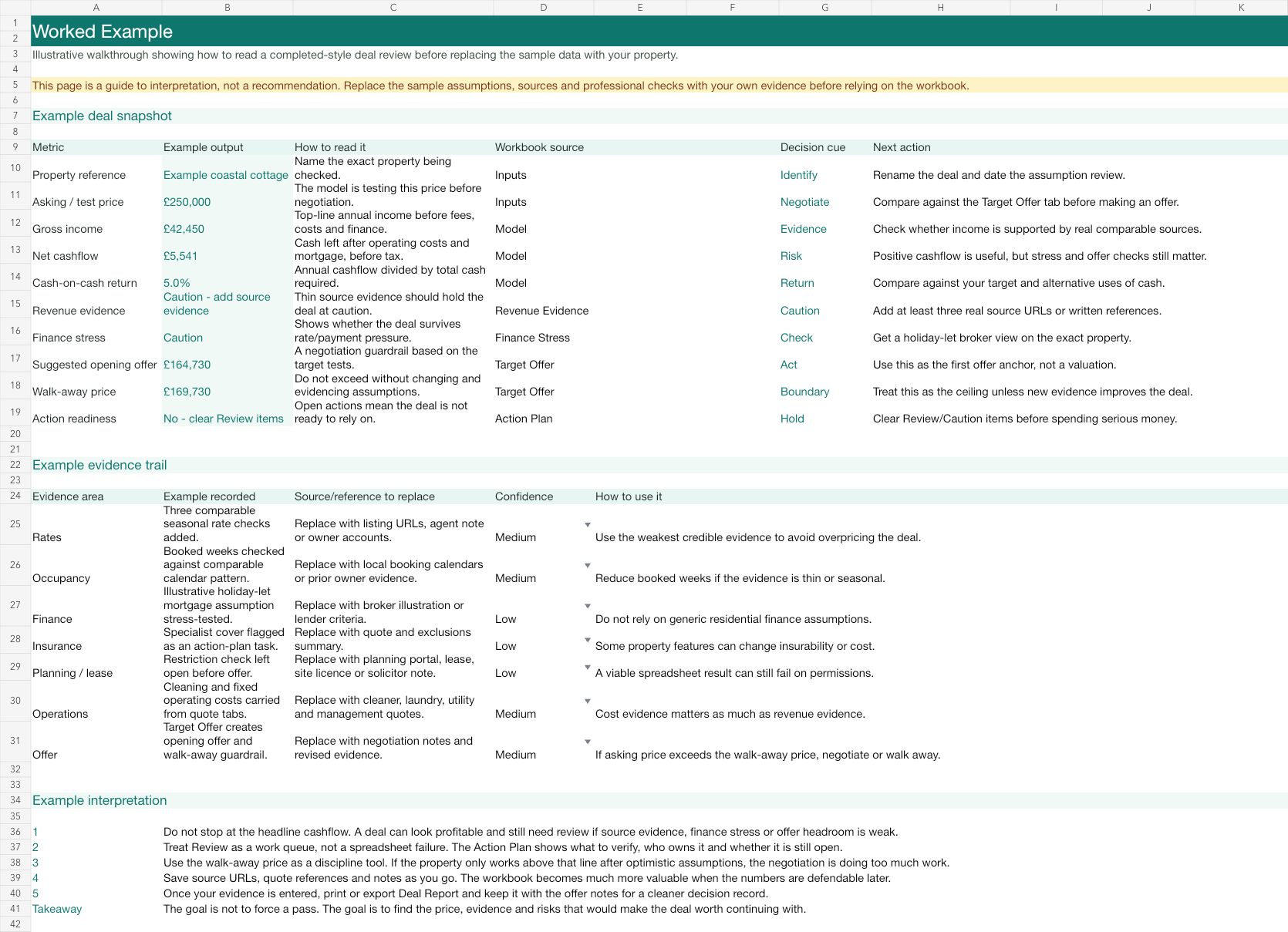
Worked Example
Worked Example
See how a completed-style review is interpreted before editing the sample data.
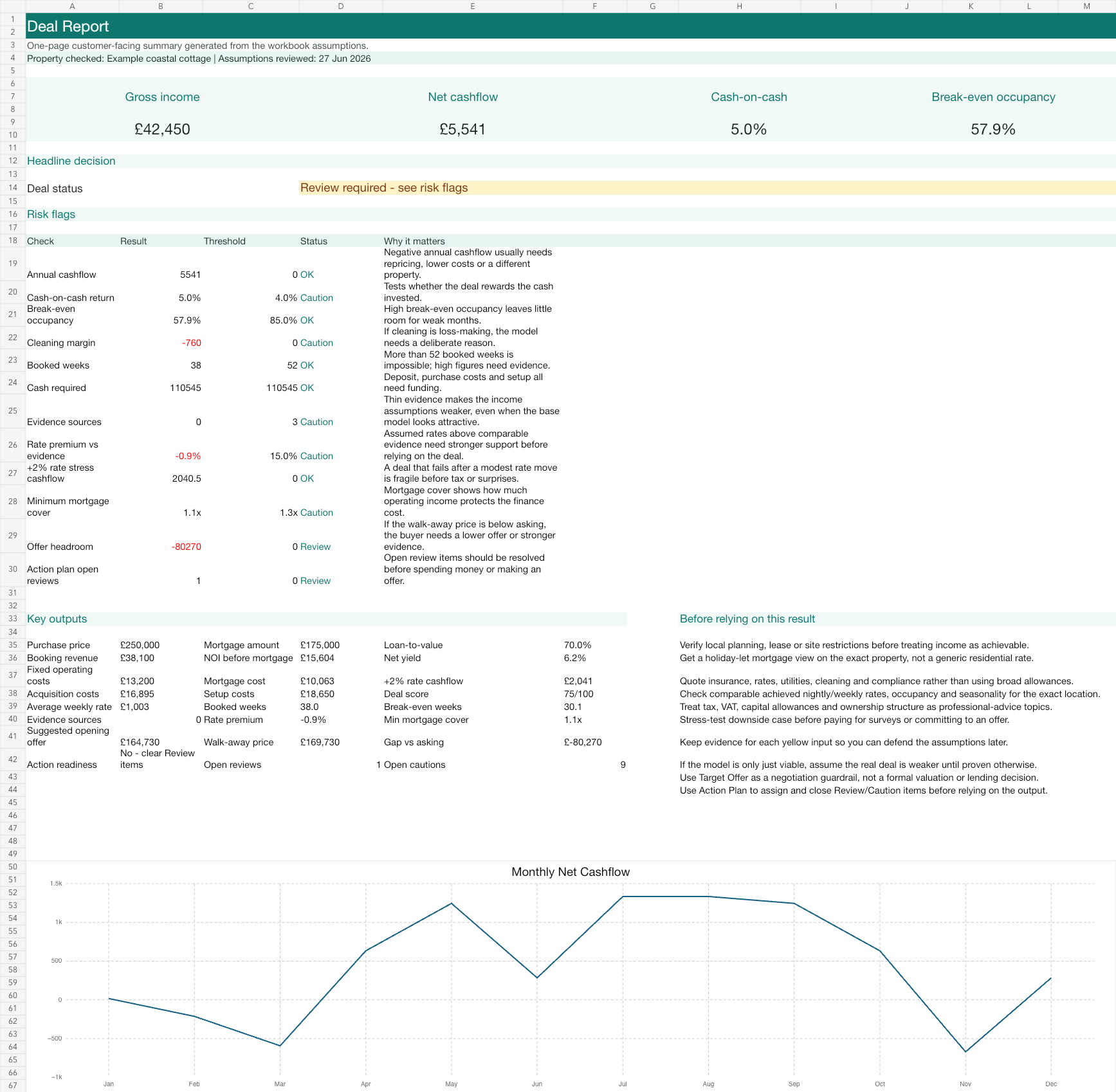
Deal Report
Deal Report
Headline cashflow, cash-on-cash, break-even occupancy, risk flags and key outputs.
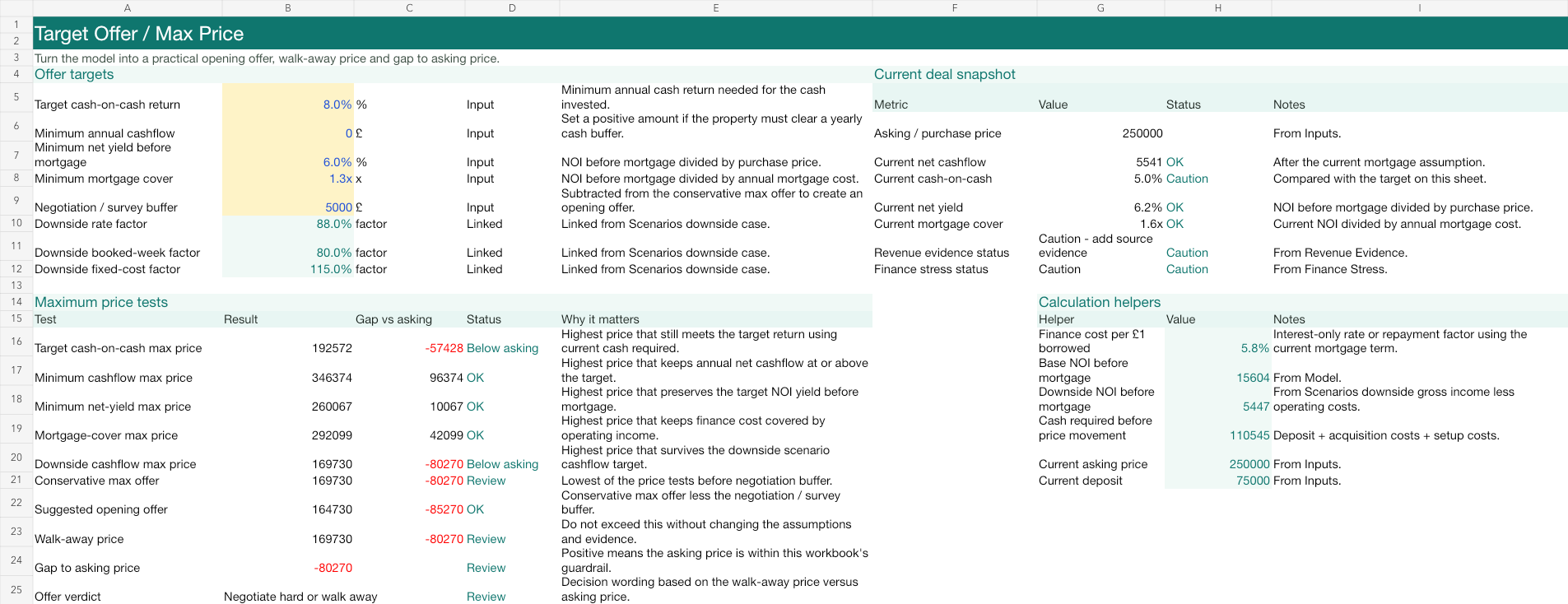
Target Offer
Target Offer
Opening offer, walk-away price and gap to asking based on the workbook guardrails.
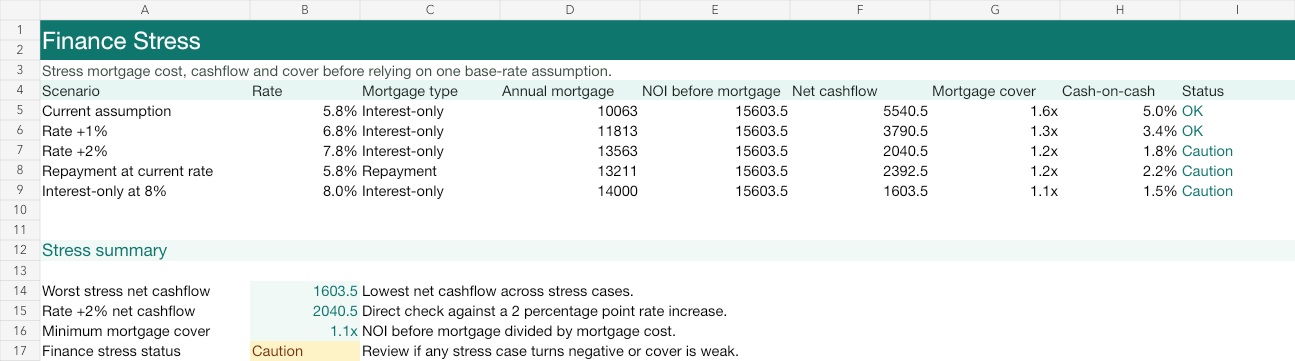
Finance Stress
Finance Stress
Rate, repayment and mortgage-cover checks before relying on one finance assumption.

Buyer Action Plan
Buyer Action Plan
Owned next steps for Review and Caution items before spending serious money.
Sample output
What the report helps you decide
- Can the deal cover debt?
- NOI, mortgage cost and post-debt cashflow
- How fragile is the offer price?
- Break-even occupancy and max-offer guide
- What needs verifying?
- Restrictions, comparable evidence and cost gaps
- What changes the outcome?
- Interest rate, deposit, occupancy and setup cost sensitivity
Use it after the free screen
Keep a proper decision record before spending more money.
The free checker is useful for fast screening. The paid spreadsheet is for serious properties where you want a clearer workbook, a saved assumption trail and a more structured view of downside risk.
After purchase
What happens after purchase.
After purchase, check the checkout confirmation and My Account downloads first. Spreadsheet purchases include the Excel workbook and Read Me First quick-start PDF where available. Pro purchases include instructions for the Pro resources area and workspace. If access does not appear, email hello@holidayletinvestor.co.uk with your order email and product name.
Digital products and templates are usually delivered electronically. Because access may be provided immediately, refunds may be limited once files, tools or member resources have been accessed, except where required by law. If you have a problem accessing your purchase, contact hello@holidayletinvestor.co.uk.
Checkout reassurance
Secure checkout through WooCommerce and the payment provider
The checkout confirms Holiday Let Deal Report + Spreadsheet — £39
Checkout confirmation and My Account downloads show workbook access where available
My Account downloads should include both the workbook and quick-start guide
Keep the receipt email for download support
Educational and illustrative modelling only
Use alongside independent evidence and professional advice
Free calculator vs £39 Deal Report + Spreadsheet vs Pro.
Use the free calculator to screen quickly. Use the £39 Deal Report + Spreadsheet when one deal needs a fuller workbook. Use Pro when you want repeated deal finding plus monthly income, expense, KPI and accounting-ready tracking after launch.
Results depend on the assumptions you enter. Small changes in occupancy, rates, finance costs and setup costs can materially change the outcome.
| Feature | Free Calculator | Deal Checker | £39 Deal Report + Spreadsheet | Deal Finder Pro | Stack Review | Done-for-you AI Workflow Build |
|---|---|---|---|---|---|---|
| Revenue estimate | Yes | Yes | Yes | Forecast and actuals | Review summary | Included where agreed |
| Deal Finder / saved shortlist | No | One property screen | No | Yes | Review summary | Included where agreed |
| Running cost estimate | Yes | Yes | Detailed | Forecast and actuals | Review summary | Included where agreed |
| Mortgage assumptions | Yes | Yes | Detailed | Original vs actual | Review summary | Included where agreed |
| Break-even occupancy | Yes | Yes | Yes | Track against actuals | Review summary | Included where agreed |
| Risk checklist | Basic | Yes | Detailed | Ongoing notes | Yes | Yes |
| Saved decision record | No | Workbook route for saved model | Yes | Finder, baseline and monthly records | Review summary | Setup notes and recommendations |
| Monthly P&L | No | No | Forecast only | Yes | Recommended workflow setup | Set up where scoped |
| KPI dashboard | No | Core screen | Core deal metrics | Yes | Recommended workflow setup | Set up where scoped |
| Actual vs forecast tracking | No | No | Manual workbook notes | Yes | Recommended setup | Set up where agreed |
| Accounting workflow | No | No | Inputs only | Export support | Review recommendation | Custom setup |
| Guest/cleaner workflow | No | No | No | Tracking support | Review recommendation | Custom setup |
| Custom automation support | No | No | No | No | Recommendations | Yes |
FAQs
Common questions
Is this financial advice?
No. The workbook organises assumptions, scenarios and next checks for one property so the decision record is easier to review.
Do I need Excel?
The workbook is spreadsheet-based and delivered as a downloadable file after purchase through the checkout and support route.
Can I use it for Airbnb, lodge or cottage investments?
Yes. It is designed for UK holiday-let style analysis, including Airbnb-style short lets, lodges, cottages and similar accommodation models where the assumptions are adapted to the property.
Why is a spreadsheet needed if there is a free calculator?
The free calculator is for a quick screen. The spreadsheet is for one serious property where you need a saved decision record, setup budget, evidence tracker, sensitivity checks and a clearer view of finance, expenses and management costs.
What decision does the workbook help with?
It helps you decide whether to keep researching, make or refine an offer, renegotiate, collect better evidence, seek professional checks or walk away before spending more money.
What happens after purchase?
After purchase, the workbook and Read Me First PDF are made available through checkout confirmation, customer account downloads or the support route shown for the order.
Can I get a refund?
Check the terms page for the current digital product refund position. If there is a genuine technical issue or you do not receive the product, contact support so it can be resolved.
Useful next steps
Use the right tool before and after the workbook.
Free calculator
Run a quick first-pass estimate before building a detailed workbook case.
Use calculatorDeal checker
Paste a listing and review score, risks and next checks before buying the workbook.
Run checkerDeal Finder Pro
Find and compare more deals, then track setup budget, monthly P&L, KPIs and actual results after launch.
View ProAI Stack Review
Get a structured review of your proposed management stack, workflows and reporting setup.
Book review